← Back to portfolio

The n8n wiring

The actual workflows behind the diagrams. The Medical Knowledge Base Generator runs as eight coordinated workflows; the Dying-Deal Watchdog is one scheduled flow.

Eight stages

Medical Knowledge Base Generator

Each content type gets its own generation workflow, then everything flows through compliance, Q&A generation, the test-and-judge harness, and export with verification. The pattern repeats: read the source rows, filter to what’s not done, loop, generate with a fenced model, parse, create the card, mark the row.

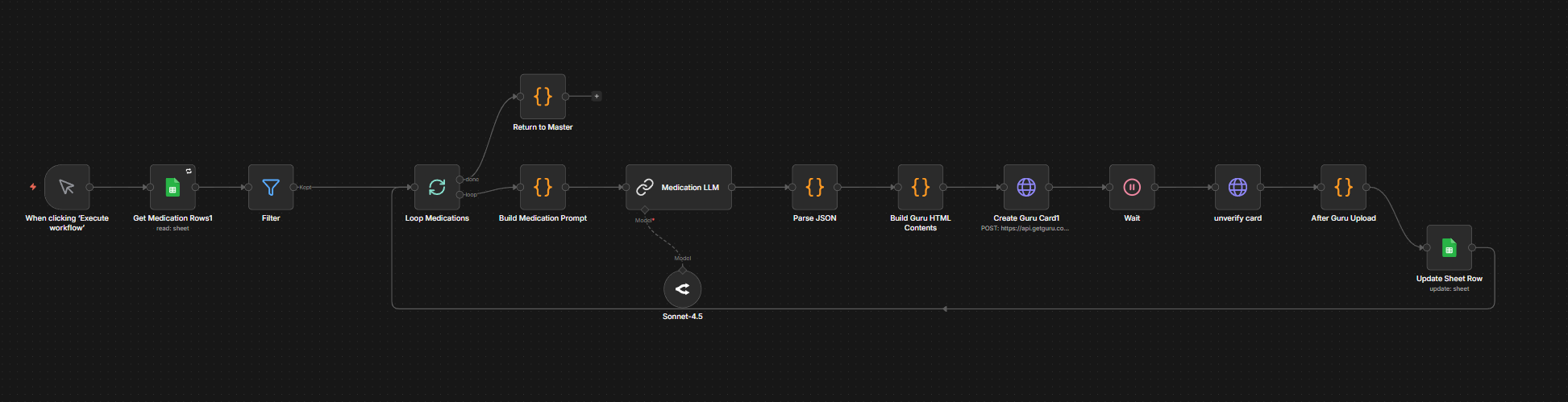
01 — Medication generation · read → filter → loop → model → parse → create card

Reads medication rows, generates a card for each with a model constrained to no dosage or recommendation content, builds the Guru HTML, and marks the row when the card is created.

Medication generation workflow

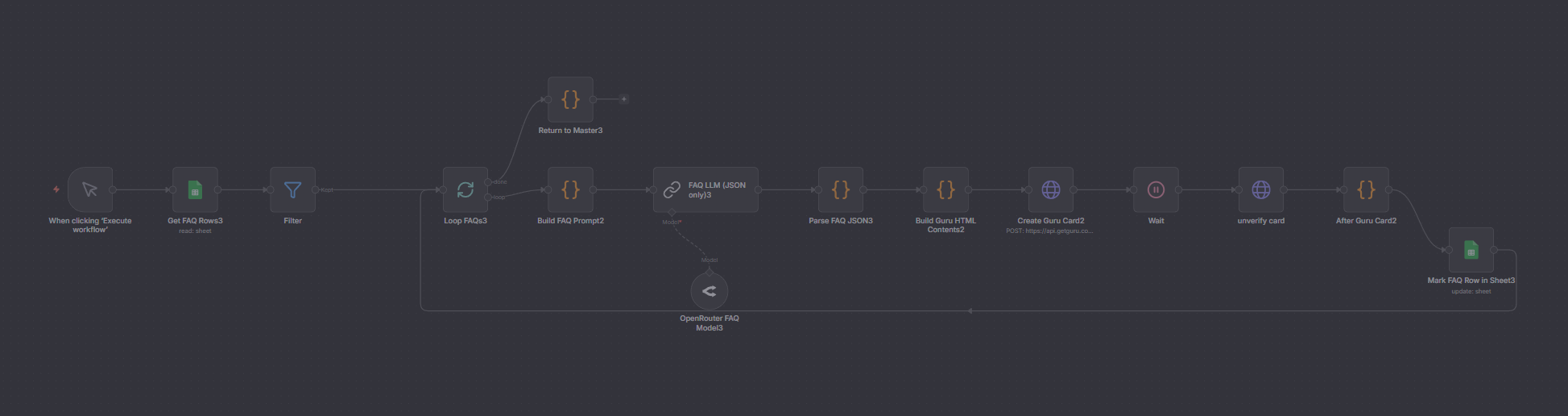
02 — FAQ generation · same pattern, FAQ content

The same generate-parse-create pattern pointed at FAQ source rows, with a model that returns JSON only.

FAQ generation workflow

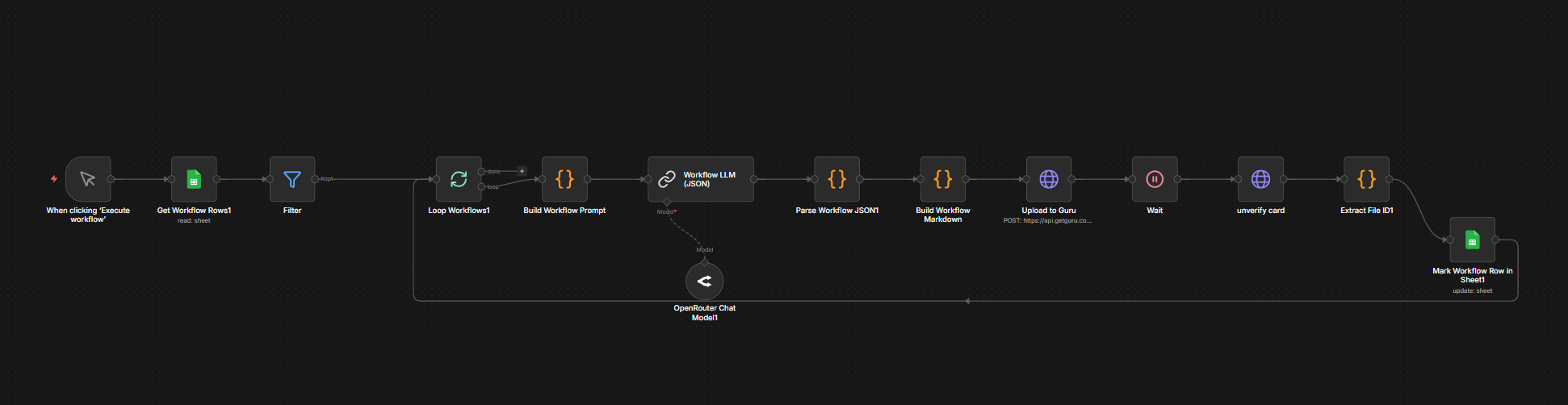
03 — Workflow generation · same pattern, workflow content

Generates workflow cards, builds markdown, uploads to Guru, and stamps the source row.

Workflow generation workflow

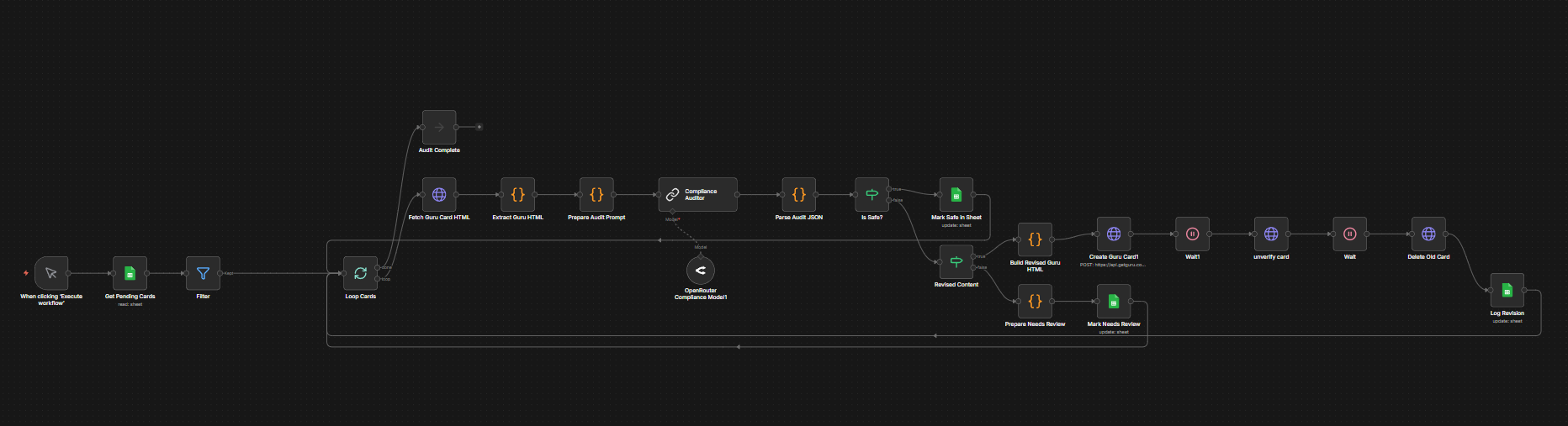
04 — Compliance auditor · gate every card, unsafe blocked

Fetches each pending card, runs it through a compliance model, and routes on an is-safe check: safe cards are marked, unsafe ones go to revision or a review queue. Nothing ships without passing this gate.

Compliance auditor workflow

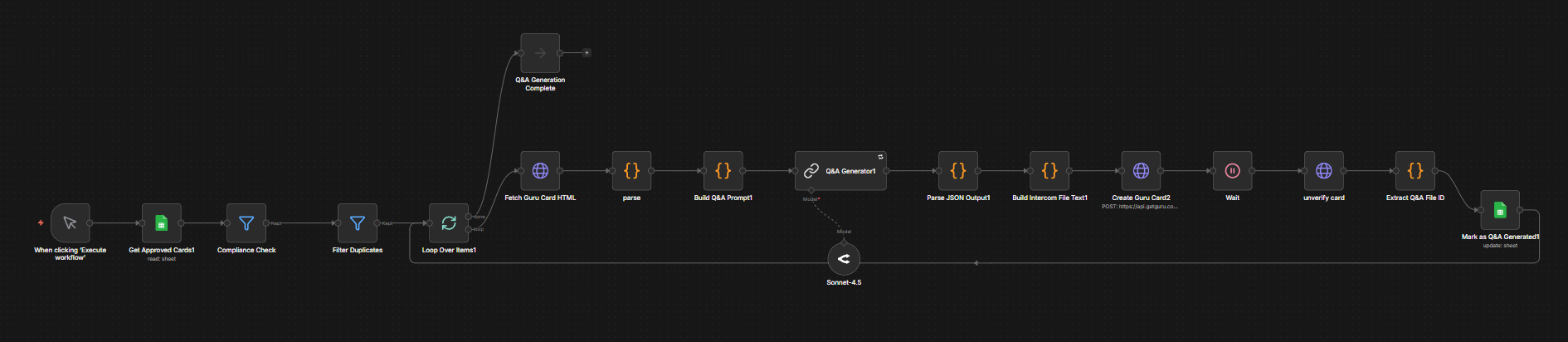
05 — Q&A generation · question and answer pairs per card

Takes approved cards, checks compliance and duplicates, then generates the question-and-answer pairs used both for the knowledge base and for the test harness.

Q and A generation workflow

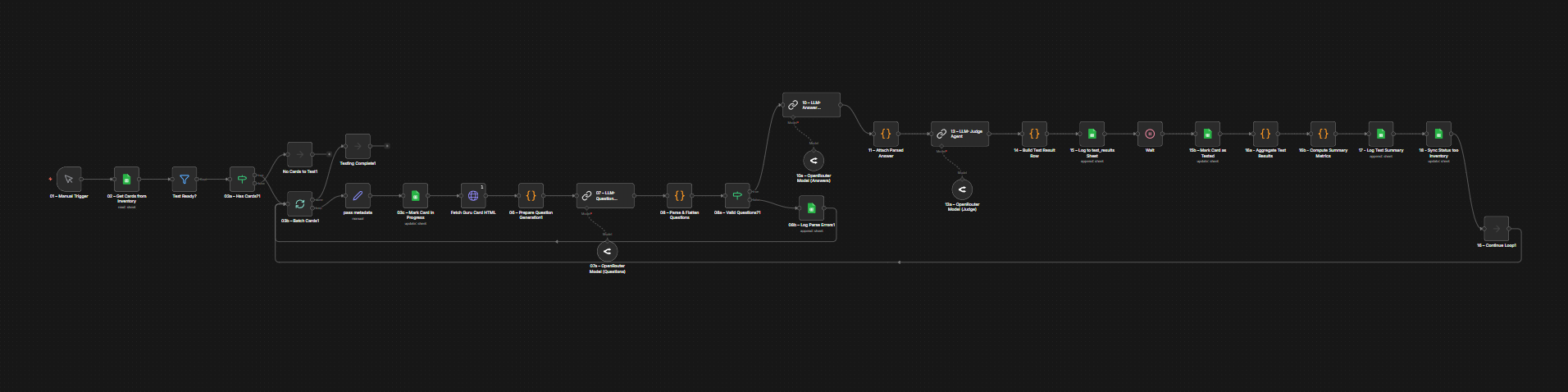
06 — Test and judge harness · generate → answer → judge → score

The core of the system. It generates questions, has a model answer them using only the card, then a separate judge model scores those answers against the source, logs the result, aggregates, and computes the summary metrics. The judge being a different model is what stops a card from grading its own work.

Test and judge harness workflow

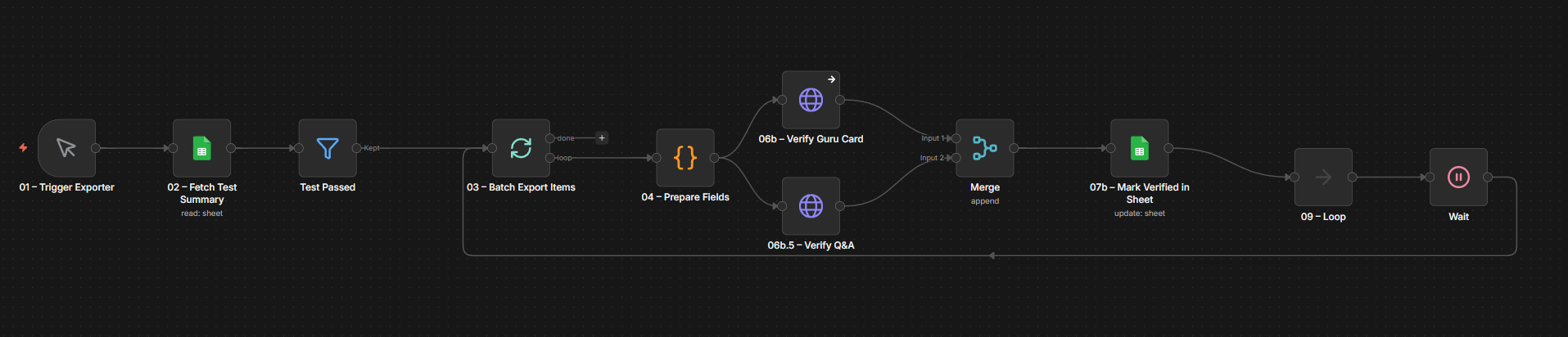
07 — Export and verify · batch export → verify in parallel → mark verified

Batches the tested items, verifies the Guru card and the Q&A in parallel, merges the results, and marks each verified in the sheet.

Export and verify workflow

One scheduled flow

Dying-Deal Watchdog

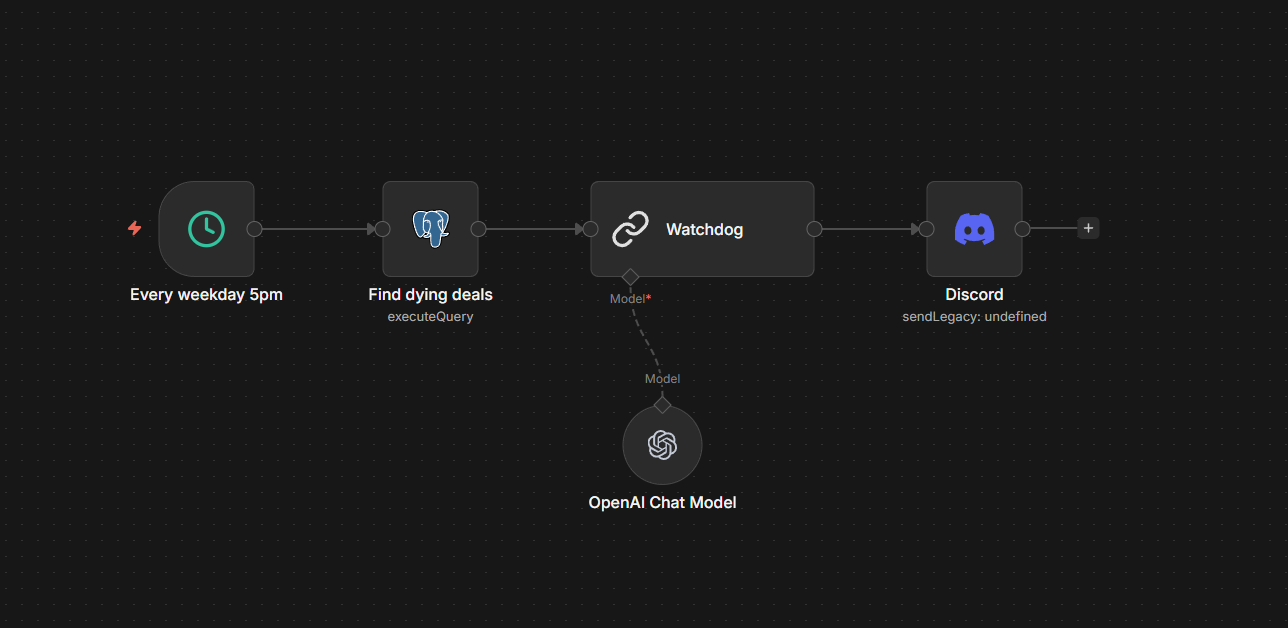
A cron trigger runs a single SQL query that finds open deals stuck past their stage norm, hands the result to a fenced model that writes a short evening note, and posts it to the team. The detection is deterministic; the model only writes prose.

Schedule → find dying deals → write the note → alert

The SQL uses window functions to compute each stage’s normal duration, then flags deals over that norm but under a cap, so it catches saveable deals rather than ones already dead. The model is told the exact structure, top ten only, and not to invent anything.

Dying-Deal Watchdog workflow

Three connected engines

Competitive Intelligence & Outbound Engine

A burner inbox subscribed to 200+ competitor newsletters feeds a strategy library built with semantic dedup, leads are matched against that library with vector search, and a two-stage writer drafts personalized outreach. The AI handles judgment and prose; vector search, structured output, idempotency, and audit logging keep it trustworthy.

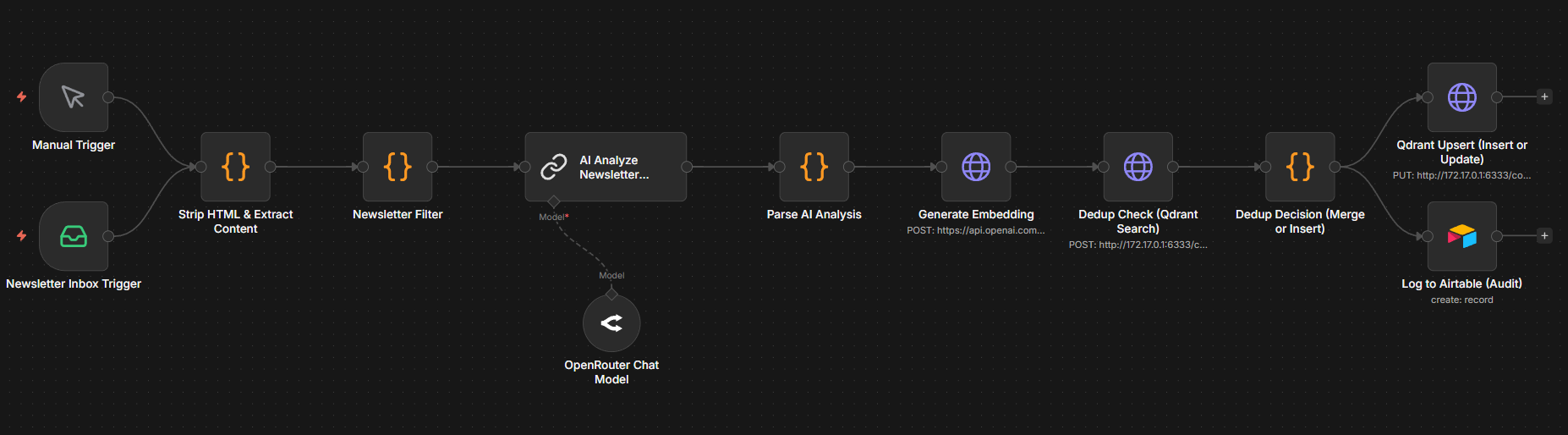
01 — Newsletter intelligence · ingest → analyze → embed → dedup → store

Each incoming newsletter is stripped to text, analyzed for its strategy, hook, and CTA type, then embedded and checked against the existing library in Qdrant. Strategies already seen get merged with an incremented example count; genuinely new ones get inserted. Everything is logged to an audit trail. The dedup is semantic, so it recognizes the same strategy even when the wording is different.

Newsletter intelligence workflow

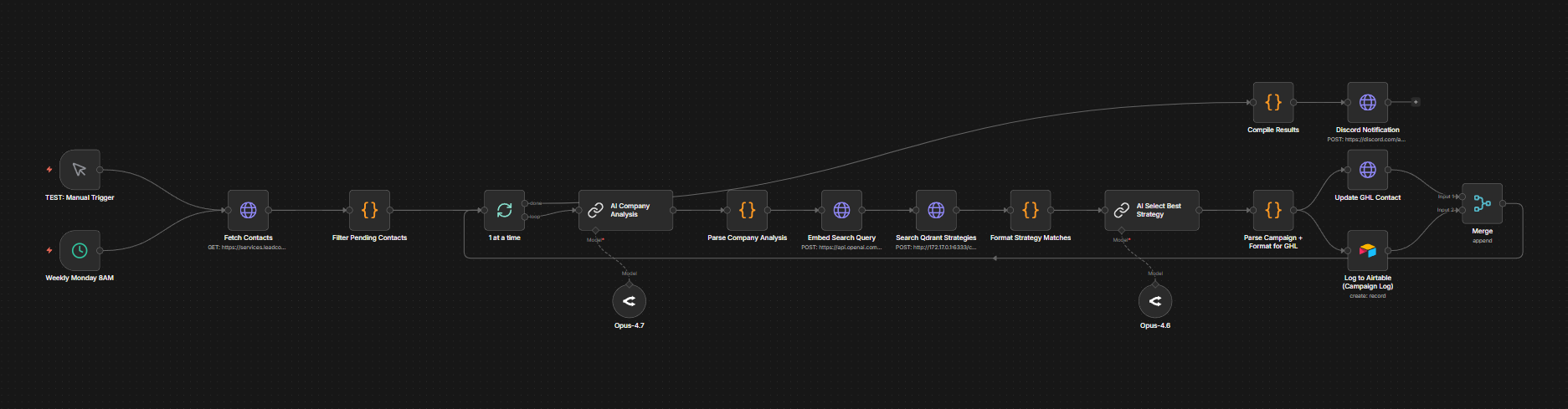
02 — Campaign matching · fetch lead → company analysis → embed → search library → select strategy

On a schedule, each pending lead gets a company analysis, then is embedded and matched against the strategy library through Qdrant vector search. A second model pass selects the single best-fit strategy and reasons through why. When no strong match exists, it falls back to a first-principles analysis rather than forcing a bad fit, so every lead gets a real plan with a confidence score.

Campaign matching workflow

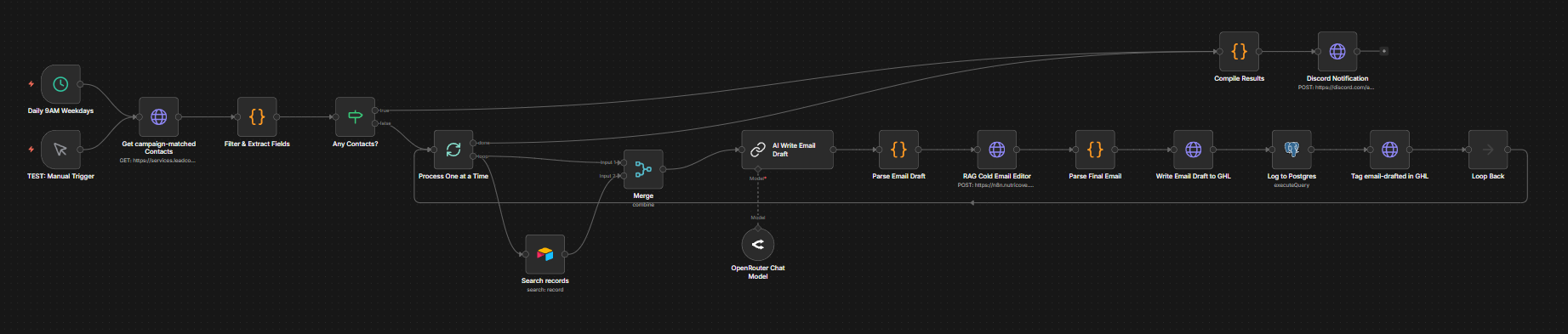
03 — Email generation · draft → RAG edit → format → write to CRM → tag

A model drafts the email from the matched strategy, then a separate RAG-based editing pass refines it, the same generate-then-verify pattern used across these builds. The output is formatted to read human and includes a full multi-touch sequence. Each contact is tagged as drafted so it is never processed twice, and the draft lands in the CRM ready for review.

Email generation workflow

Eight stages

Lead Generation Engine

A form submission enters at stage one and moves through enrichment, verification, scoring, audience-building, sequencing, CRM sync, partner qualification, and an AI mini-audit, each its own n8n workflow. The pattern repeats: read the records, filter to what’s pending, process in batches, update, log a summary. The CRM sync is deliberately near the end, so only clean, verified, scored leads ever reach it.

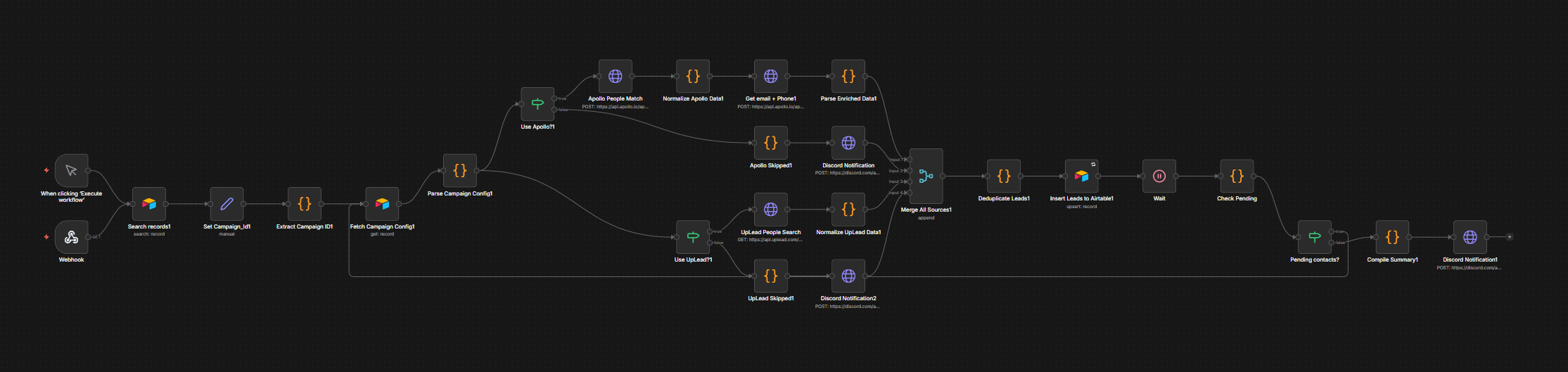
01 — Intake & enrichment · webhook → match source → set campaign → fetch config → enrich → dedup → store

A form submission hits the webhook. The system matches where it came from, sets the campaign ID, and fetches that campaign’s config, which decides the enrichment path (Apollo, UpLead, or both). It enriches, merges the results, deduplicates in case the lead came through twice, inserts to Airtable, and notifies the team when the pipeline is clear. The enrichment path being config-driven per campaign is what makes it reusable.

Lead intake and enrichment workflow

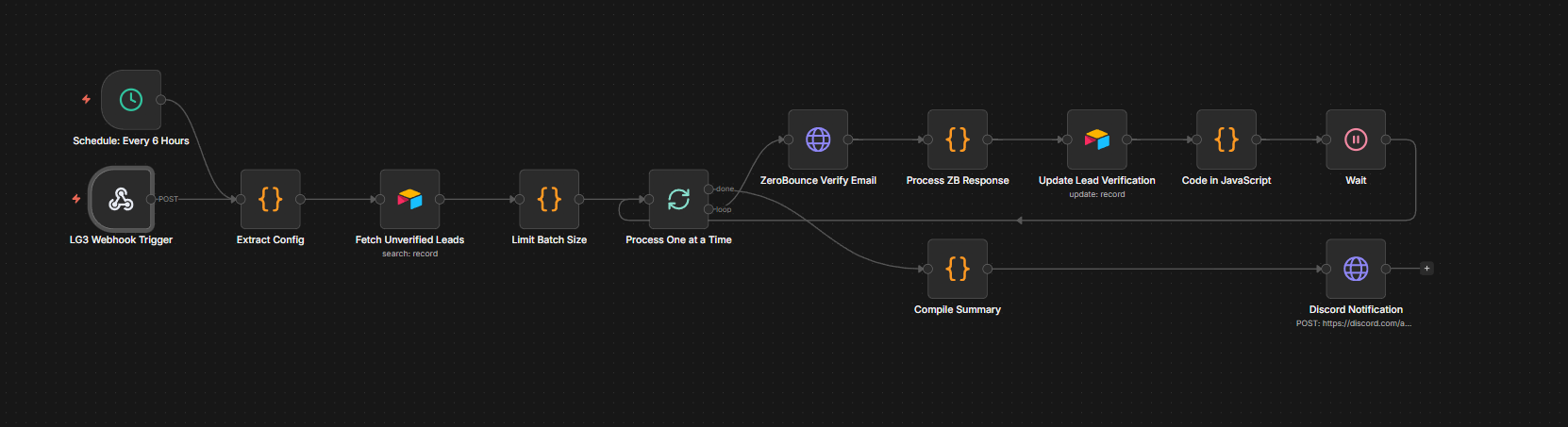
02 — Email verification · fetch unverified → batch → ZeroBounce → mark status

Runs unverified leads through ZeroBounce and marks each valid, catch-all, or bounced. Bounced addresses are dropped so they never reach outreach or the CRM.

Email verification workflow

03 — Scoring & grading · fetch → score & grade → batch update

Scores and grades each lead on firmographics (headcount, revenue) and email reachability, then writes the score and grade back in batches, looping until done.

Lead scoring and grading workflow

04 — Audience building · build ZIP clusters → generate Meta audience CSV → upload

Turns scored leads into geographic clusters and a Meta ad-audience CSV, saved to Drive, so paid targeting is built from the same scored data, not a separate guess.

Audience building workflow

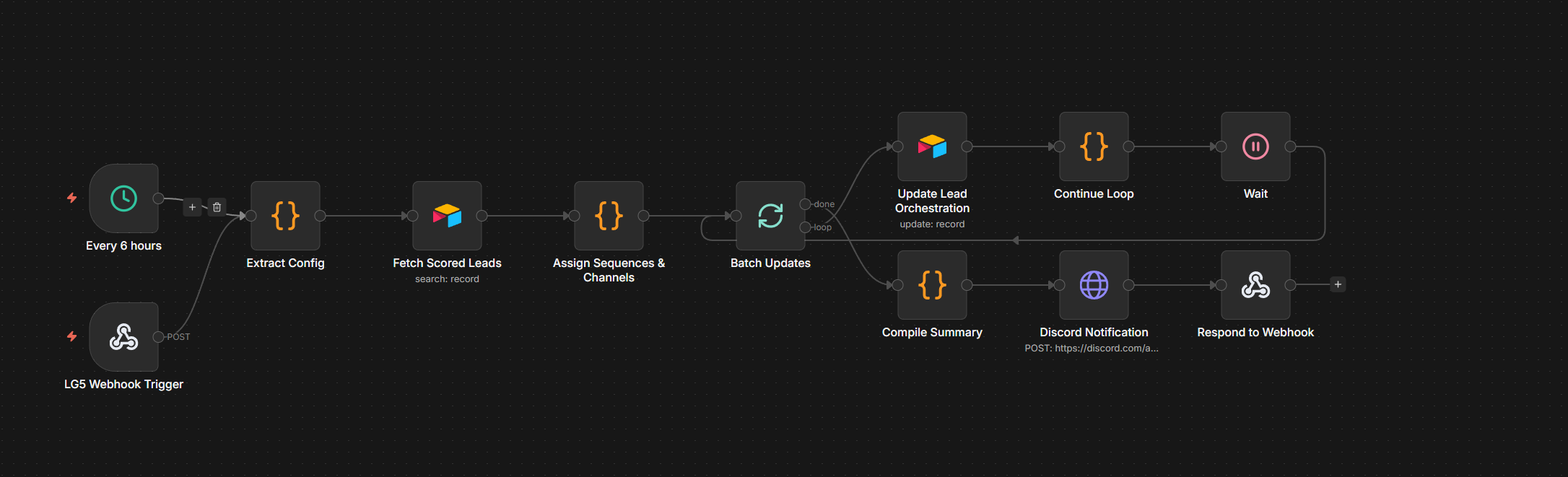
05 — Sequence assignment · fetch scored → assign sequences & channels → orchestrate

Assigns each scored lead to the right outreach sequence and channel and updates the orchestration state, so the follow-up cadence is driven by the lead’s score, not a flat blast.

Sequence assignment workflow

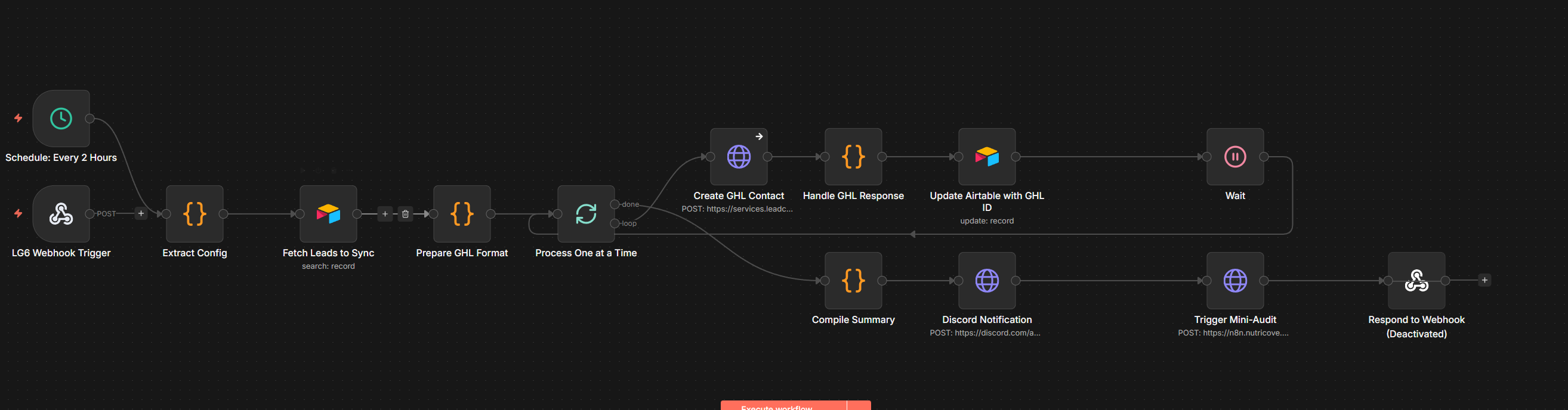
06 — CRM sync · prepare GHL format → create contact → update Airtable → trigger audit

Only now do leads sync to the CRM. Each is formatted for GoHighLevel, created as a contact, the CRM ID is written back to Airtable, and the mini-audit is triggered. Keeping this last is what keeps junk out of the CRM.

CRM sync workflow

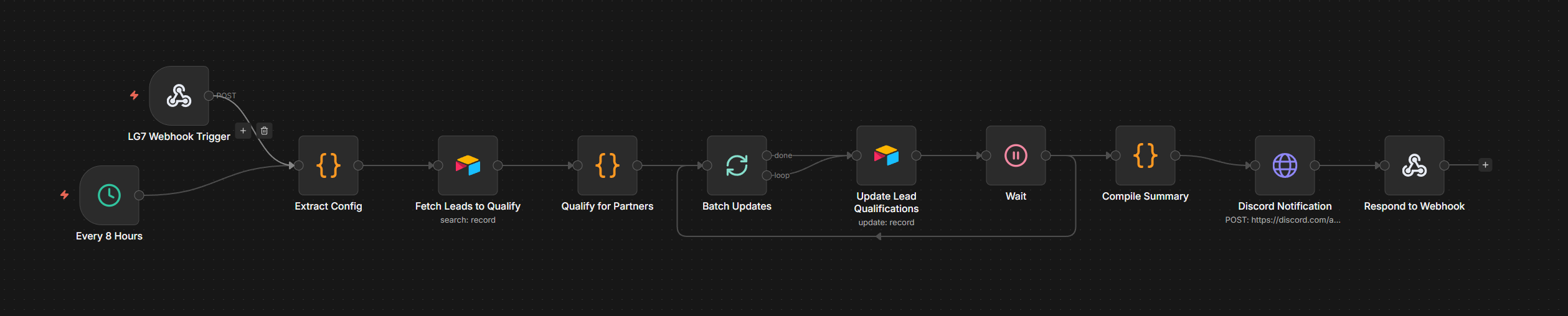
07 — Partner qualification · fetch → qualify for partners → update

Runs a separate qualification pass to flag which leads fit partner criteria, updating each record so downstream routing can act on it.

Partner qualification workflow

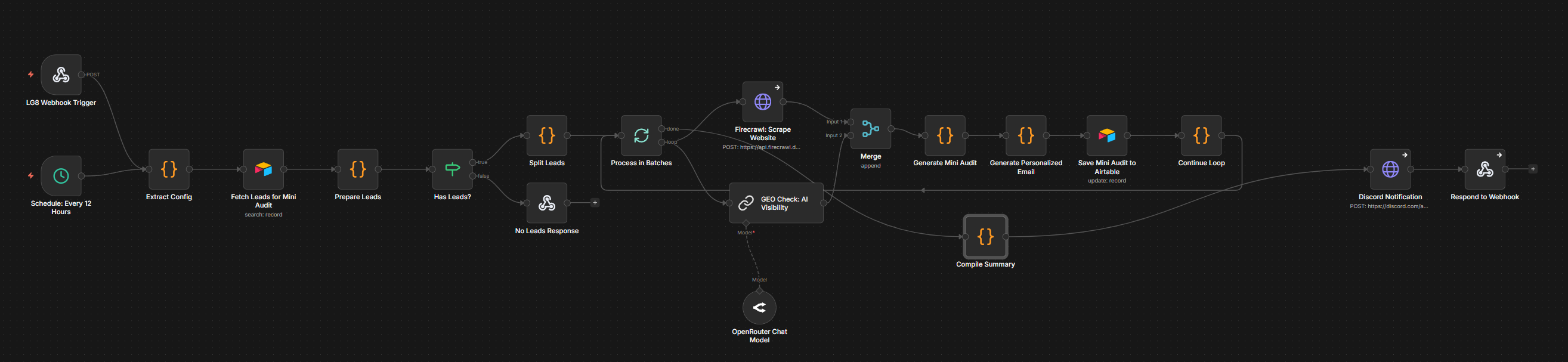
08 — AI mini-audit & personalization · scrape site → geo-visibility check → generate audit + email

For each lead, scrapes their website (Firecrawl), checks local and AI search visibility, then a fenced model generates a short mini-audit and a personalized email off the findings, saved for review. The AI writes prose off real scraped data, not guesses.

AI mini-audit and personalization workflow